
[Published: June 14, 2026 | Last updated: June 14, 2026] | 10 min read
TL;DR
- Types of computer network are classified by geographic size and purpose, from PAN (one person’s devices) to WAN (global connections like the internet) (GeeksforGeeks, 2026).
- The four core types are PAN, LAN, MAN, and WAN. Everything else — WLAN, VPN, SAN, CAN — is built on top of these (KaaShiv InfoTech, 2026).
- The global networking market was valued at $443.86 billion in 2024 and is expected to reach $597.07 billion by 2029 at a 6.11% CAGR (GlobalData, 2024).
- The global enterprise networking market is projected to grow from $140.42 billion in 2026 to $287.32 billion by 2034 (Fortune Business Insights, 2026).
- LAN is the fastest type for local use, reaching up to 10 Gbps on modern hardware. WAN is slower due to long-distance data travel (KaaShiv InfoTech, 2026).
Types of computer network define how devices connect and communicate – from Bluetooth earbuds paired to your phone to multinational companies linking offices across continents. Choosing the wrong network type for your use case means poor speed, unnecessary cost, or security gaps. This guide explains every major type clearly, with real examples and a comparison table.
What Is a Computer Network and Why Does the Type Matter?
A computer network is a group of interconnected devices that share data and resources with each other (WebAsha Technologies, 2025). That definition covers everything from two phones sharing files over Bluetooth to the global infrastructure powering the internet.
The type of network matters because each one is designed for a different scale, speed requirement, and security model. A home Wi-Fi setup and a city-wide broadband network both “connect devices,” but they use completely different hardware, protocols, and cost structures. Using the wrong type for your situation means paying for capacity you don’t need, or not having the reach you do need.
Networks are classified in two main ways: by geographic coverage (how far the network stretches) and by purpose (what the network is designed to do). Most of the standard naming — LAN, WAN, MAN — refers to geographic size. VPN and SAN refer more to purpose.
PAN: Personal Area Network
A Personal Area Network (PAN) connects personal devices around a single person, typically within a range of up to 10 meters (about 33 feet) (GeeksforGeeks, 2026). It is the smallest network type by design.
You use a PAN every day without thinking about it. Pairing wireless earbuds to your phone is a PAN. Connecting a smartwatch to sync fitness data is a PAN. Tethering a laptop to mobile data creates one too.
PANs split into two categories. A wired PAN uses USB to connect devices directly. A wireless PAN (WPAN) uses Bluetooth, Zigbee, or infrared (Vedantu, 2022). Bluetooth is by far the most common technology for PANs in everyday life.
The advantages are simplicity and cost. No infrastructure needed, no router, no ISP. The limitation is obvious: 10 meters is the ceiling. PANs are built for personal convenience, not shared access.
LAN: Local Area Network
A Local Area Network (LAN) connects devices within a limited area — a home, an office floor, a school building — and is the most commonly used network type for everyday computing (Guru99, 2026). Coverage typically runs up to a few hundred meters.
This is what your office network is. Every computer connected to the same router in a building is on a LAN. Shared printers, file servers, and internal databases all operate inside it. The LAN is private by default — no outside regulatory body controls what runs on it, which makes it faster and easier to secure than a wide-area connection (Guru99, 2026).
Speed is a genuine strength. Modern LANs reach up to 10 Gbps using Gigabit Ethernet hardware — far faster than any WAN connection of comparable cost (KaaShiv InfoTech, 2026). That speed makes LANs the right choice for anything requiring fast local data transfer: video editing workstations sharing footage, hospital systems pulling patient records instantly, gaming setups minimizing lag.
The limitation is physical range. A LAN doesn’t stretch between buildings without bridging technology, and expanding coverage adds administration overhead. Every device added to a LAN needs proper configuration to keep the network secure.
WLAN: Wireless Local Area Network
A Wireless Local Area Network (WLAN) is simply a LAN with no cables — devices connect via Wi-Fi instead of Ethernet. Your home router creates a WLAN (KaaShiv InfoTech, 2026).
The distinction between LAN and WLAN matters in professional settings. Wired LAN connections are faster and more secure; a signal on a cable can’t be intercepted from outside the building. WLAN trades some speed and security for the convenience of mobility. Most modern office networks run both — wired for fixed workstations, wireless for laptops, phones, and tablets.
Wi-Fi 6 and Wi-Fi 6E, now standard on most new routers, push WLAN speeds beyond 1 Gbps in ideal conditions, which has narrowed the gap with wired connections significantly for everyday use.
CAN: Campus Area Network
A Campus Area Network (CAN) connects multiple buildings across a defined campus — a university, a corporate park, a hospital complex — typically spanning 1 to 5 kilometers (WebAsha Technologies, 2025).
It sits between LAN and MAN in scale. A university where students in one building can access library servers, administrative databases, and shared printers in another building is running a CAN. All the LANs inside each building connect through the campus network infrastructure.
CANs are often privately owned and managed, which means faster internal speeds and tighter access control than a MAN, which relies on public or third-party infrastructure.
MAN: Metropolitan Area Network
A Metropolitan Area Network (MAN) covers a city or large urban area, typically ranging from 5 to 50 kilometers (Studocu, 2025). It is larger than a LAN but smaller than a WAN.
City-wide public Wi-Fi networks, cable TV infrastructure connecting neighborhoods, and government agency networks linking municipal offices across a city are all MANs. ISPs building broadband networks for a specific metropolitan area operate at this scale.
The technology behind most MANs uses fiber optic cables, with Ethernet, ATM, and FDDI protocols handling the data (Vedantu, 2022). Dhaka’s city-wide broadband infrastructure connecting ISPs across districts is a real-world example of a MAN operating at scale.
MAN requires fewer resources than WAN to implement and generally costs less to build and maintain, while still providing high-speed urban connectivity. The tradeoff is the fixed geographic boundary — a MAN doesn’t extend beyond its city.
WAN: Wide Area Network
A Wide Area Network (WAN) connects networks across large geographic distances — between cities, countries, or continents. The internet is the largest WAN in the world (GeeksforGeeks, 2026).
Any time a company’s Dhaka office shares files with its Singapore branch over a private leased connection, that’s a WAN. Multinational corporations maintain private WANs to link offices globally without routing sensitive data through the public internet.
WAN is slower than LAN for a straightforward physical reason: data travels farther. A signal crossing continents experiences latency that a signal crossing a building floor doesn’t. Satellite connections, fiber optic undersea cables, and leased telephone lines all form the physical backbone of WAN infrastructure.
Cost and complexity are the main barriers. Building and securing a WAN requires significant investment in hardware, leased lines, and ongoing network management. Security is harder too — data traversing public or semi-public infrastructure needs encryption and strict access controls.
The global enterprise networking market — which WANs represent the core of at scale — was valued at $140.42 billion in 2026 and is projected to reach $287.32 billion by 2034 (Fortune Business Insights, 2026).
VPN: Virtual Private Network
A Virtual Private Network (VPN) is not a network type by size — it is a network type by purpose. A VPN creates an encrypted, private tunnel through a public network (usually the internet) so that data travels securely as if it were inside a private network.
Remote employees accessing company files through the internet use a VPN. Their laptop in a coffee shop in Dhaka connects to the company’s servers in Singapore as if they were sitting in the office. The data is encrypted end to end so the coffee shop Wi-Fi can’t intercept it.
VPNs run on top of WANs and LANs rather than replacing them. They add the security layer that public networks don’t provide by default. The global network security market — which VPN infrastructure is part of — was valued at $28.58 billion in 2025 and is projected to reach $33.39 billion in 2026 (Fortune Business Insights, 2026).
SAN: Storage Area Network
A Storage Area Network (SAN) is a specialized high-speed network designed exclusively to move data between servers and storage devices — not for general user access. Think of it as a dedicated lane on a highway for storage traffic only (WebAsha Technologies, 2025).
Large data centers, hospitals managing imaging files, and media production companies storing terabytes of video footage use SANs. The speed and reliability requirements for moving large files between servers and storage arrays are too demanding for a general-purpose LAN, which is why SANs run on separate infrastructure.
The global data center networking market — where SANs are core infrastructure — is projected to grow from $44.37 billion in 2026 to $114.08 billion by 2034, driven largely by AI workload demands (Fortune Business Insights, 2026). McKinsey predicts global data center capacity could nearly triple by 2030, with approximately 70% of new demand coming from AI workloads (Network World, 2026).
A Short Case Study: Network Types in One University
A mid-sized university in Bangladesh runs all four core network types simultaneously without most students realizing it.
Each lecture hall and office uses a LAN — wired Ethernet connections giving staff reliable, fast access to the university’s internal systems. Across the campus, a WLAN lets students connect laptops and phones to Wi-Fi in corridors and common areas. The CAN ties all the buildings together, so a student in the library accesses the same databases as one in the engineering faculty.
The university’s WAN connection links its main campus to a satellite campus in another district via a leased fiber line. And the IT department uses a VPN so staff working from home can access administrative systems securely without putting internal data on the public internet.
Five network types, one institution, all running at once.
Quick Comparison: All Network Types at a Glance
| Type | Full Name | Coverage | Speed | Common Example |
|---|---|---|---|---|
| PAN | Personal Area Network | Up to 10 meters | Low to medium | Bluetooth earbuds, smartwatch sync |
| LAN | Local Area Network | Building/floor | Up to 10 Gbps | Office computers on shared network |
| WLAN | Wireless LAN | Building/floor | Up to 1 Gbps+ | Home Wi-Fi router |
| CAN | Campus Area Network | 1-5 km | High | University campus network |
| MAN | Metropolitan Area Network | 5-50 km | Medium-High | City-wide broadband or cable TV |
| WAN | Wide Area Network | Country/global | Lower (latency) | The internet, multinational office links |
| VPN | Virtual Private Network | Any distance | Depends on base network | Remote work secure access |
| SAN | Storage Area Network | Data center | Very high | Hospital imaging storage, media servers |
Common Mistakes When Choosing a Network Type
Using LAN where a WLAN would do: many small offices over-invest in wired infrastructure when their devices are mostly laptops and phones that benefit from wireless mobility. Wired still wins for fixed workstations that need maximum speed; for everything else, modern Wi-Fi 6 is fast enough.
Confusing VPN with network size: a VPN is not a “type” in the same sense as LAN or WAN. It is a security protocol layered on top of an existing network. Setting up a VPN doesn’t change your underlying network type.
Underestimating WAN security requirements: WAN data crosses infrastructure you don’t own. Businesses that treat a WAN connection like a local office network without proper encryption and access controls create serious security exposure.
Mixing up MAN and WAN scope: a MAN covers a city; a WAN covers countries and continents. A common confusion in planning documents is calling a city-level ISP connection a WAN when it is technically a MAN.
Frequently Asked Questions About Types of Computer Network
What are the four main types of computer network?
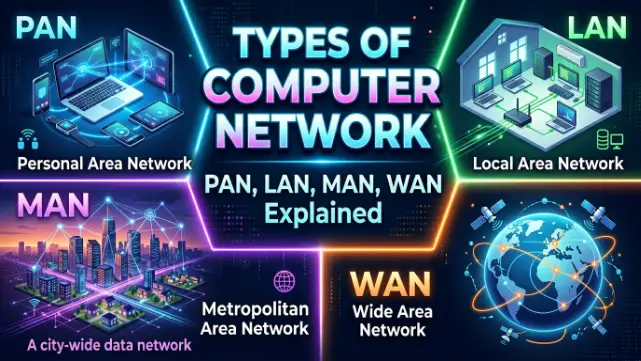
The four core types are PAN (Personal Area Network), LAN (Local Area Network), MAN (Metropolitan Area Network), and WAN (Wide Area Network). All other types — WLAN, CAN, VPN, SAN — are either variations of these or purpose-specific layers built on top of them (KaaShiv InfoTech, 2026).
What is the difference between LAN and WAN?
LAN connects devices within a limited local area like a building or floor, with speeds up to 10 Gbps and private ownership. WAN connects networks across cities, countries, or continents, with lower effective speeds due to distance and higher complexity and cost (GeeksforGeeks, 2026).
Is the internet a LAN or WAN?
The internet is a WAN — the largest WAN in the world. It connects billions of devices across every country through a combination of fiber optic cables, satellite links, and public infrastructure (KaaShiv InfoTech, 2026).
What is the fastest type of computer network?
LAN is the fastest for local use, reaching up to 10 Gbps on modern Gigabit Ethernet hardware. SAN is faster still within data center environments where storage-to-server connections are optimized specifically for throughput. WAN is the slowest due to the physical distance data must travel.
What is the difference between LAN and WLAN?
LAN uses physical cables (Ethernet) to connect devices. WLAN uses wireless radio signals (Wi-Fi). Wired LAN is faster and more secure; WLAN provides mobility. Most modern networks run both. Your home router creates a WLAN for wireless devices and a LAN for anything plugged in directly (KaaShiv InfoTech, 2026).
What network type does a VPN use?
A VPN doesn’t replace a network type — it adds encrypted tunneling on top of an existing network, usually a WAN. VPNs let remote users access private networks securely across public internet infrastructure.
Key Takeaways
- The size ladder runs PAN to LAN to CAN to MAN to WAN, from one person’s devices to global connectivity.
- LAN is the fastest and most cost-effective for local use. WAN is the most complex and expensive but necessary for connecting across distances.
- WLAN, CAN, VPN, and SAN are either variations on the core four or purpose-specific network architectures built on top of them.
- Most organizations run multiple network types simultaneously without realizing it — a university, hospital, or enterprise typically operates LAN, WLAN, CAN, WAN, and VPN at the same time.
- The global networking market is growing fast, with enterprise networking projected to reach $287.32 billion by 2034 (Fortune Business Insights, 2026).