
[Published: June 11, 2026 | Last updated: June 11, 2026] | 9 min read
TL;DR
- Android TV and Google TV share the same core OS – Google TV is a smarter interface layered on top of Android TV, not a separate system
- Google TV wins on content discovery with AI-powered recommendations that pull shows across all streaming apps at once
- Android TV wins on simplicity, customization, and performance on older or budget hardware
- Combined, Google TV and Android TV now run on 300 million active devices globally (Google I/O, May 2026)
- For most buyers in 2026, Google TV is the better default – but Android TV holds its ground for power users and budget shoppers
Android TV vs Google TV: The Core Difference
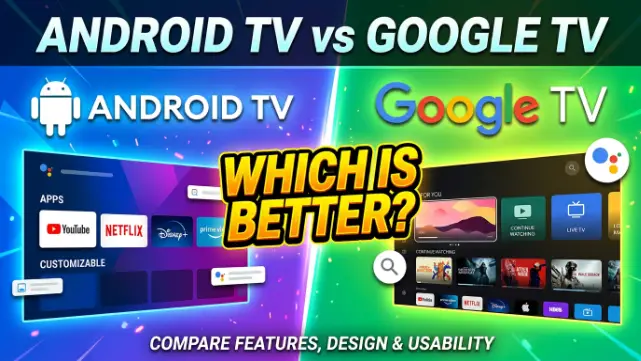
Android TV vs Google TV is not a competition between two separate operating systems. Google TV is a redesigned interface that runs on top of Android TV’s OS – same engine, different dashboard.
Think of it this way: Android TV is the engine under the hood. Google TV is the new instrument cluster that replaced the old one. The car still runs the same way. What changed is how you interact with it day to day.
Android TV launched in 2014 as Google’s first purpose-built TV platform. It organized everything into a horizontal row of apps – clean, but app-first. To find a movie, you had to remember which service carried it, open that app, and search there. Google TV arrived in 2020 with a different philosophy: show me the content, not the apps. It pulls recommendations from Netflix, Prime Video, YouTube, Disney+, and other linked services directly onto the home screen, so you browse shows instead of services.
That shift – from app-first to content-first – is the whole debate.
How the Two Interfaces Actually Look and Feel
The home screen difference is immediate. It’s the first thing every new buyer notices.
Android TV’s home screen is a horizontal row of installed apps, plus a row of recent and recommended content below it. Navigation is straightforward: you know your apps, you open them, you find your content inside. No surprises. On underpowered hardware, this simplicity is an advantage – less going on means less lag.
Google TV’s home screen is built around a “For You” tab that aggregates recommendations from every connected streaming service. There’s also a dedicated Movies tab, Shows tab, Apps tab, and a Library section for purchases. The watchlist feature lets you save titles from any platform and see them all in one place. Practical? Genuinely yes – especially for households subscribed to three or four services at once.
A real-world example: a family running Netflix, Hotstar, YouTube, and ZEE5 on Android TV would need to open each app separately to browse what’s new. On Google TV, trending content from all four surfaces on the home screen without opening anything. That single difference changes the daily experience more than any spec sheet suggests.
Google Assistant and Voice Search: Where Google TV Has a Clear Edge
Both platforms support Google Assistant. The gap is in what that Assistant can actually do on each platform.
On Android TV, voice search works inside individual apps or pulls up search results from the Play Store and a few connected services. It’s usable but limited by which apps have integrated properly with the older API.
On Google TV, voice search is system-wide and content-aware. Ask “show me thrillers on Netflix” and you get a filtered Netflix list without opening the app. Ask “what’s Tom Hanks in?” and it pulls results across every linked service at once. Google confirmed at I/O 2026 that Google TV is also adding improved pointer remote support (9to5Google, May 2026), making navigation more precise for users with compatible remotes.
This is not a marginal difference on paper. Day to day, cross-app voice search saves real time.
App Ecosystem and Compatibility: Closer Than You Think
Both platforms use the Google Play Store for TV. Same store, same apps – in theory.
In practice, the app experience is nearly identical. Both support Netflix, YouTube, Prime Video, Disney+, Hotstar, Spotify, and the full range of major streaming services. More than 10,000 OTT applications are compatible with Android TV/Google TV, with over 2,500 optimized for large-screen navigation (Market Reports World, 2026).
The one area where Android TV historically had a practical advantage: sideloading. Loading apps not available in the Play Store was easier on Android TV, particularly on third-party boxes from Xiaomi, NVIDIA Shield, and similar brands. That gap is narrowing. A Google policy announced in 2025 now requires app developers to register and verify identity before their apps can be installed on certified hardware (TroyPoint, 2026). This affects both platforms – sideloading is becoming more restricted across the board.
Bottom line: if you only use official apps, both platforms are equal. If sideloading matters to you, check your specific device before buying.
Performance: Hardware Matters More Than the Platform
Performance differences between Android TV and Google TV are mostly a hardware question, not a software one.
Google TV’s interface is more resource-intensive than Android TV’s. On a budget TV with 2GB RAM and a weak processor, Google TV can feel sluggish – slower menus, delayed recommendations loading. The same TV running plain Android TV will feel snappier because there’s less running in the background. On mid-range and flagship hardware (3GB+ RAM), the difference mostly disappears.
That said, Google TV can push interface updates through the Play Store independently of full OS upgrades. New features arrive faster than they would through a manufacturer’s firmware update cycle. Android TV’s update cadence depends almost entirely on the TV brand – some manufacturers push updates promptly, others lag by months or skip versions entirely (FPD Vision, 2025).
For buyers: if you’re choosing a budget TV under $250, Android TV often runs better on that tier’s hardware. At $350 and above, Google TV runs well on most current devices.
Which TV Brands Use Android TV vs Google TV in 2026?
This matters for anyone shopping by brand rather than by feature.
Google TV brands (2025-2026 models):
- Sony (Bravia XR and Bravia 2 series)
- TCL (C6 and higher tiers)
- Hisense (U7 and U8 series)
- Chromecast with Google TV (streaming stick)
- Most new Philips smart TVs
Android TV brands (current lineup):
- Xiaomi (most models globally, including Mi TV range)
- Many budget TCL models
- NVIDIA Shield TV (flagship Android TV box, still the top performer in its class)
- Several Hisense entry-level models
- Some older Sony stock still in retail
Samsung (Tizen) and LG (webOS) run neither platform. The Android TV vs Google TV question doesn’t apply to those brands at all (Sony Mony Electronics, 2026).
Privacy: What Both Platforms Collect and Why It Matters
Both platforms collect user data. Google TV collects more of it.
Google TV’s personalized recommendations require continuous analysis of viewing history, search behavior, and connected account activity. The more it learns, the better the suggestions get – but that trade-off is explicit. Android TV collects less by default because its interface relies less on behavioral data to function. The home screen shows apps, not tailored suggestions, so there’s less reason to track what you watch.
Users on either platform can audit permissions under Settings > Privacy, but Google TV’s personalization features degrade noticeably if data collection is restricted. Android TV works largely the same whether privacy settings are tight or loose.
This isn’t a dealbreaker for most buyers. But for households with strong privacy preferences – or for shared workplace displays – Android TV’s lighter data footprint is a real consideration, not just a talking point.
Case Study: A Streaming Family Switched from Android TV to Google TV
A household in Dhaka running three streaming subscriptions – Chorki, Netflix, and YouTube Premium – switched from a Xiaomi Mi TV (Android TV) to a TCL C6 (Google TV) in early 2026.
The feedback after 60 days was specific: the Google TV watchlist feature saved the most time. Before, each family member bookmarked shows differently across separate apps. After the switch, a shared watchlist showed everyone’s saved titles in one screen, regardless of which service carried them.
The one complaint: the Google TV home screen felt crowded during the first week. It took about five days of watching before the “For You” tab started surfacing relevant Bangla content alongside international picks. Once calibrated, it stayed accurate.
Their verdict: Google TV won on daily usability. The Android TV interface, by comparison, felt like managing a folder system rather than browsing content.
The Market Picture in 2026
The numbers tell a clear story about direction.
Google TV and Android TV together reached 300 million active devices globally as of May 2026, up from 270 million in 2024 – though growth has slowed to roughly 11% year over year. Android TV/Google TV platforms together account for approximately 41% of all global smart TV shipments (Market Reports World, 2026). Android TV holds the largest single OS market share at over 43% of the smart TV segment in 2025 (Grand View Research, 2026).
What do these numbers mean for buyers? Simple: Google’s ecosystem dominates the non-Samsung, non-LG TV market. Support, app updates, and developer attention will continue concentrating here. A TV running Android TV or Google TV bought today will receive software attention for years.
Android TV vs Google TV: Head-to-Head Comparison
| Feature | Android TV | Google TV |
|---|---|---|
| Interface style | App-first (horizontal grid) | Content-first (AI recommendations) |
| Home screen | Apps + limited suggestions | Unified feed across all linked services |
| Voice search | App-level | Cross-app, service-aware |
| User profiles | Single profile | Multiple profiles per household |
| Google Assistant | Supported | Deeper integration |
| Sideloading | Easier (device-dependent) | More restricted |
| Privacy | Lower data collection | Higher data collection |
| Performance on budget hardware | Better | Can feel sluggish below 3GB RAM |
| Software updates | Manufacturer-dependent | Faster via Play Store layer |
| Watchlist | Not available | Cross-service watchlist built in |
| Best for | Power users, budget buyers, Xiaomi fans | Most households, content browsers |
Who Should Choose Android TV
Android TV is the right call in these specific situations.
You’re buying a budget TV and performance matters more than smart features. Android TV’s lighter interface holds up better on entry-level chipsets.
You rely on sideloading apps not available in the Play Store – IPTV players, regional streaming tools, or open-source media managers like Kodi. Android TV (especially on NVIDIA Shield) still offers more flexibility here.
You want a minimal, distraction-free interface. No recommendation feeds, no content tabs, no AI watching your watch history. Open an app, watch what you came to watch, close it.
You already own an Android TV device that works fine. There’s no urgency to upgrade just for the Google TV interface.
Who Should Choose Google TV
Google TV suits most buyers shopping for a new TV in 2026.
You subscribe to two or more streaming services and waste time deciding what to watch. The unified recommendation feed actually solves this – it’s not marketing, it’s a practical fix for subscription fatigue.
You want a shared TV experience for a household with different tastes. Multiple user profiles mean each person gets separate recommendations without polluting everyone else’s watchlist.
You care about Google ecosystem integration – Chromecast, Google Photos, Google Home smart devices. Google TV ties all of these together more cleanly.
You’re buying a mid-range or flagship TV. On hardware above the budget tier, Google TV runs well and the feature advantage is real.
Common Questions About Android TV vs Google TV
What is the difference between Android TV and Google TV?
Android TV is the underlying operating system – it has powered smart TVs and streaming devices since 2014. Google TV is a redesigned interface that runs on top of the Android TV OS, launched in 2020. They share the same core, but Google TV adds content discovery, user profiles, a watchlist, and deeper Google Assistant integration. Every Google TV device is running Android TV underneath. Not every Android TV device runs Google TV.
Can I upgrade my Android TV to Google TV?
In most cases, no. Google TV is a separate interface that comes preloaded on supported hardware. It’s not available as a downloadable upgrade for existing Android TV devices. If you want Google TV, you need a new device that ships with it – such as a Chromecast with Google TV or a supported TCL, Sony, or Hisense model.
Is Google TV replacing Android TV?
Google TV is clearly where Google is directing development resources in 2026. New flagship and mid-range devices from Sony, TCL, and Hisense ship with Google TV by default. Android TV persists on budget models and older stock, and some manufacturers like Xiaomi continue using it across their lineup. Android TV will receive support for years – it won’t disappear overnight – but new feature development is concentrated on Google TV.
Which is better for gaming – Android TV or Google TV?
Both platforms run games from the Google Play Store. Android TV has historically offered slightly broader game access, particularly on devices like NVIDIA Shield that are designed with gaming in mind. Google TV’s game support is equivalent on capable hardware. For casual gaming, either works fine. For serious Android gaming on a TV, NVIDIA Shield running Android TV remains the benchmark device.
Does Google TV collect more data than Android TV?
Yes. Google TV’s recommendation engine tracks viewing habits, search behavior, and account activity more extensively than Android TV’s simpler interface requires. Both platforms offer privacy controls under Settings. Restricting data collection on Google TV noticeably reduces the quality of its recommendations – that trade-off is built into the platform’s design. Android TV’s core features function normally even with stricter privacy settings in place.
Which platform is better for Bangladeshi and South Asian viewers?
Google TV’s cross-app aggregation works well for the mixed content pattern common in South Asia – streaming JioCinema, Chorki, ZEE5, Netflix, and YouTube simultaneously. Once the recommendation engine calibrates to regional content preferences (typically within one to two weeks of regular use), it surfaces local content alongside international picks without needing to browse individual apps. Android TV works fine for regional content too but requires opening each app manually.
Key Takeaways
- Google TV is Android TV with a smarter, content-forward interface – not a different operating system
- For daily use in a multi-subscription household, Google TV’s unified discovery saves real time
- Android TV remains a strong choice for budget buyers, power users, and anyone who values simplicity over personalization
- Hardware quality matters more than platform choice at the budget end – a poorly specced Google TV will feel worse than a well-specced Android TV
- The market is moving toward Google TV: new mid-range and flagship TVs from major brands ship with it by default in 2026